
Company
Review rep applications effectively
Use the current Applications workspace to compare fit, save promising reps, and spend contact credits deliberately.
An application means the rep independently expressed interest in the opportunity. It is stronger evidence of intent than a recommendation, but your company should still verify fit before using a contact credit or starting a commercial conversation.
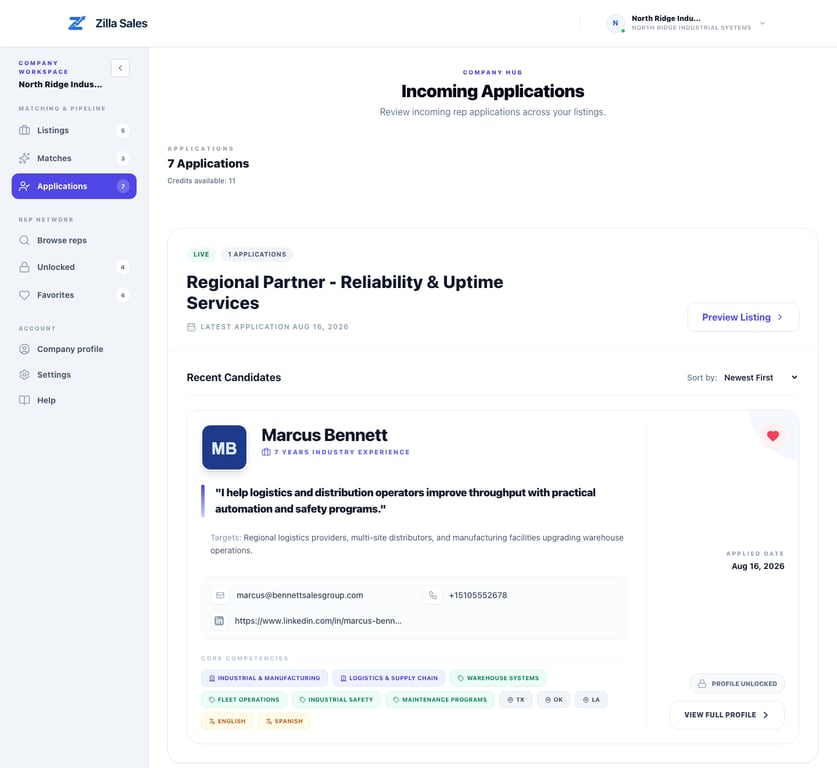
Open the correct application group
Open Applications. Applications are grouped by opportunity so you can compare each rep against the right product, territory, buyer, and commercial terms.
The group label also shows whether the opportunity is Live, Under Review, or Not Live. A rep may have applied while a prior version was active, so read the current listing before deciding.
Use the available sorting and profile evidence
Sort candidates by Newest First when response speed matters or Most Experience when you want to inspect tenure first. Then review:
- Territories and travel coverage
- Industries, products, and sell tags
- Target customers and buyer types
- Channels and languages
- One-liner and years of experience
- Agency identity and line-card considerations
- Available contact types
- Potential conflicts, warehouse capability, canvassing, or fee expectations when shown
Experience length is only one signal. Buyer access, territory, product adjacency, availability, and a credible explanation of fit can matter more.
Use favorites as an internal shortlist
Favorite a promising profile when the team needs to compare it with other applicants or return later. Favoriting does not notify the rep and does not consume a credit.
A practical review rubric is:
| Decision | Evidence |
|---|---|
| Review first | Direct buyer and territory overlap with a credible product fit |
| Keep shortlisted | Partial or adjacent fit worth a second look |
| Do not unlock yet | Important information is missing or the team cannot follow up |
| Move to outreach | Fit is credible, contact access is worthwhile, and an owner is ready |
Use favorites for your in-product shortlist. Applicants also appear in the Outreach log, where you can record your own contact attempts, replies, calls, notes, and follow-up dates. A log status is your company’s record; changing it does not accept or reject the application or notify the rep. See Track rep outreach and follow-ups for the next step after reviewing an applicant.
Decide whether to unlock
Before selecting Unlock Contact Data, open the full profile when needed and confirm that a credit is available. An unlock reveals the contact details currently available for one profile and stores the rep under Unlocked.
Unlocking does not guarantee a reply or agreement. Assign an outreach owner before spending the credit and contact the rep promptly with the specific opportunity and reason for fit.
If there are no applications
Confirm that the listing is live, then check Matches and Browse reps. Recommendations can exist without applications, and a self-service search works best when your team also performs direct outreach.
Follow No matches or applications yet for a complete diagnostic.
If an application or unlock looks wrong
Refresh once and verify the opportunity group, company account, subscription state, and credit balance. For an incorrect profile, missing application, or repeatable unlock error, contact support@zillasales.com with the opportunity link, rep-profile link, timestamp, and screenshot.
Related guides
Was this article helpful?
Tell us whether this answered your question.