
Company
Manage unlocked reps and start outreach
Turn contact access into a timely, relevant conversation while keeping your own follow-up record and respecting rep privacy.
Unlocking a profile is the start of your company’s outreach work. The rep may have applied, appeared as a recommendation, or been found in the wider directory, so confirm the intent stage before writing.
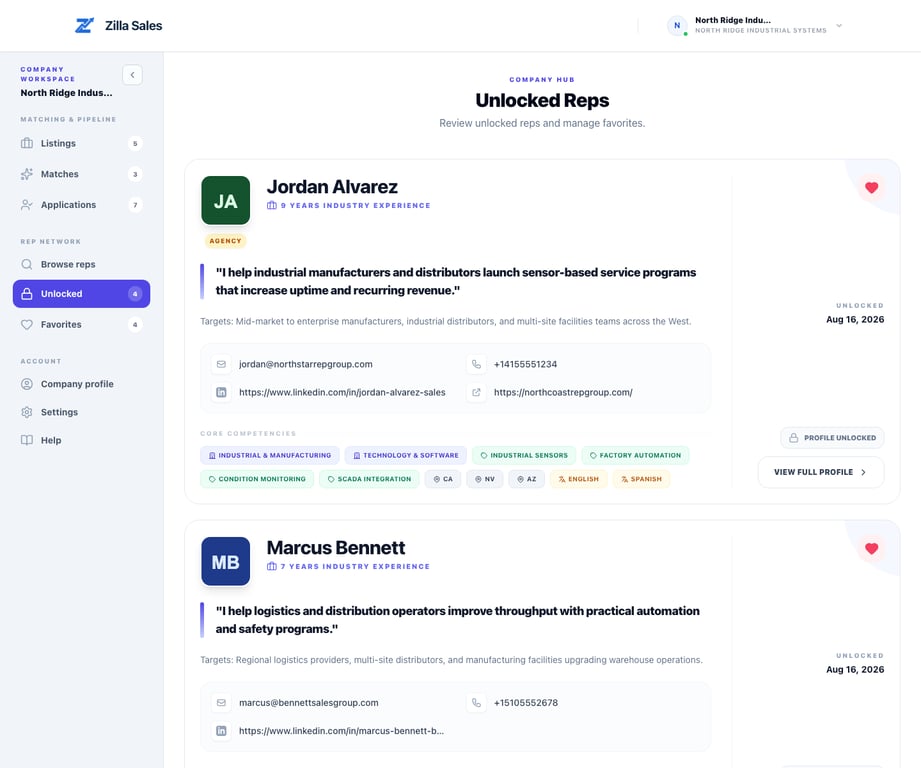
Find a previously unlocked rep
Open Unlocked Reps. The page keeps profiles whose contact data your company has already unlocked, including the available email, phone, LinkedIn, or agency website information.
Open the full profile to recheck territories, target customers, industries, line-card evidence, and agency details before contacting the rep.
Know the rep’s intent stage
- Applicant: the rep actively applied to the opportunity
- Recommendation: Zilla identified possible fit, but the rep may not have seen the opportunity
- Directory or favorite: your team found and saved the profile independently
Use warmer language with an applicant. With a recommendation or directory profile, introduce the opportunity and ask whether the timing and line are relevant rather than implying prior interest.
Send a useful first message
Contact the rep promptly, ideally while the opportunity and profile review are fresh. Include:
- Your name and company
- The specific product or opportunity
- Why the rep’s territory, buyer, channel, or line-card experience looked relevant
- The commission or commercial structure at a useful level
- One clear next step
Example:
Hi Jordan — I’m Maya from North Ridge Industrial. Your work with plant-maintenance buyers in California looks relevant to our condition-monitoring line. We are looking for an independent rep for California and Nevada on an 8–14% commission structure. Would you be open to a 20-minute fit call next week?
Avoid mass-mail language, exaggerated urgency, or a message that hides the company and product.
Follow up without over-contacting
If there is no reply, send one concise follow-up through the most appropriate channel. Reference the original message and add useful context rather than repeating it. Move on when the rep declines, reports a conflict, asks not to be contacted, or remains unresponsive after a reasonable follow-up.
Use the Outreach log to record contact dates, email replies or phone outcomes, intro calls, next actions, and when you start working together. Add a follow-up reminder and a short note so you know what to do next. The log records what your team reports; saving an update does not send a message or detect a reply. See Track rep outreach and follow-ups for the complete workflow.
Handle inaccurate or unavailable contact data
Check another available contact method and confirm that your message used the correct address or number. If a field clearly belongs to someone else, an email bounces, or the rep says the profile is outdated, stop using the incorrect detail and contact support@zillasales.com with the profile link and affected field.
Do not post a rep’s personal contact information publicly or add it to unrelated marketing lists.
Qualify before making commitments
Confirm current availability, buyer access, territory, line-card conflicts, expected support, contract structure, commission basis, expenses, exclusivity, and termination terms directly with the rep. Zilla provides discovery and contact access; your company and the rep own due diligence, contracting, commissions, and the working relationship.
Related guides
Was this article helpful?
Tell us whether this answered your question.