
Company
What happens after you pay
A current first-week roadmap from activation to recommendation review, direct outreach, and applicant follow-up.
Your next step
Start your first rep conversations
- 1. Find suitable reps
- 2. Unlock a strong fit
Review their experience, then use a credit.
- 3. Send an introduction
Reach out directly and plan your follow-up.
Payment activates the self-service features and renewal terms shown at checkout. Your opportunity then moves into the active matching and marketplace workflow.
Start your first rep conversations
Already purchased? Watch the 3-minute walkthrough to find your matches, use contact credits, review applicants, and follow up. You can also search the rep directory yourself, using territory and industry filters to find suitable reps.
Immediately after payment
- Confirm the correct opportunity appears under Listings.
- Check its publication and review status.
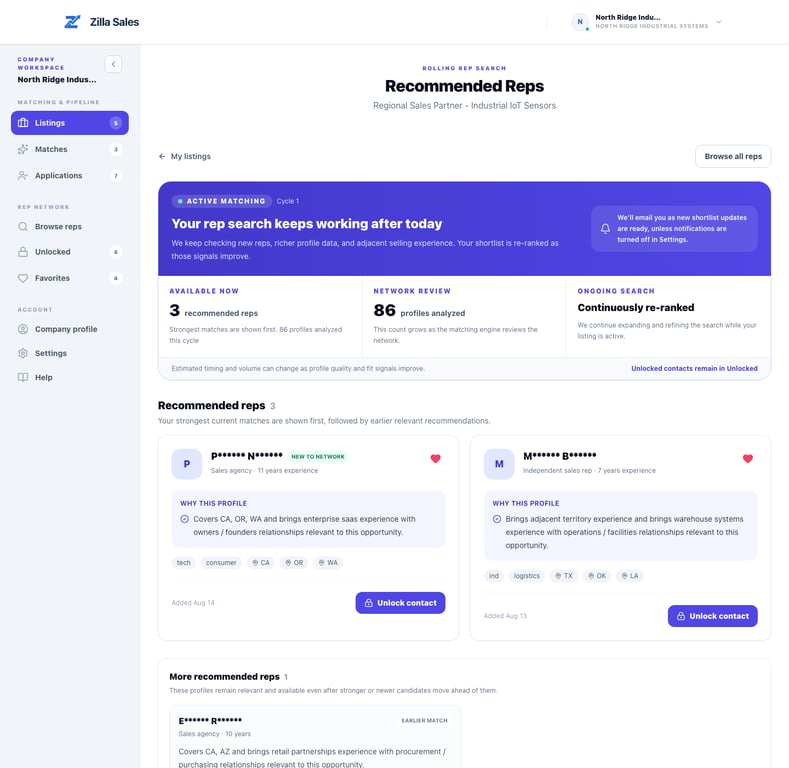
- Open Matches to follow the opportunity-specific search.
- Confirm the contact-credit balance included with your plan.
- Review Settings → Notifications so shortlist updates reach the right inbox.
When recommendations appear
The engine releases credible recommendations after reviewing enough profile evidence. The first release may contain fewer than three profiles for a narrow search. Matching continues while the opportunity remains active, and stronger or newer profiles can move ahead of earlier recommendations.
Use recommendations and applications differently
- A recommended profile has opportunity-specific evidence of possible fit; interest is not confirmed.
- An applicant actively responded to the opportunity.
- An unlocked contact reveals available contact details for direct outreach after a credit is used.
- A verified introduction is part of the separate Managed Rep Launch service.
Your first-week operating rhythm
- Review new recommendations and applicants promptly.
- Read the rationale and full profile before unlocking.
- Contact selected reps with a message tied to their actual buyer, territory, or line-card overlap.
- Record replies, calls, notes, and your next follow-up in the Outreach log. Track rep outreach and follow-ups explains the fields and status filters.
- Improve vague opportunity details if recommendations are too broad.
- Keep matching-progress notifications enabled unless someone is monitoring Matches directly.
Self-service versus Managed Rep Launch
The subscription gives your team marketplace, matching, profile, credit, and outreach tools. Managed Rep Launch is a separate application-only service in which Zilla validates the market, refines positioning, conducts outreach, screens responses, confirms interest, and coordinates qualified conversations.
Related guides
Was this article helpful?
Tell us whether this answered your question.