
Account
Cancel a subscription or request the 30-day guarantee
Use the billing portal to stop renewal and understand the separate eligibility rules for a first-term guarantee request.
Cancelling a subscription and requesting a refund under the 30-day guarantee are different actions. Cancellation stops a future renewal. It does not automatically refund the current term.
Cancel future renewal
- Sign in with the company account that owns the subscription.
- Open Settings.
- Select Billing & Plan.
- Open the billing portal.
- Cancel the subscription and confirm the effective date shown there.
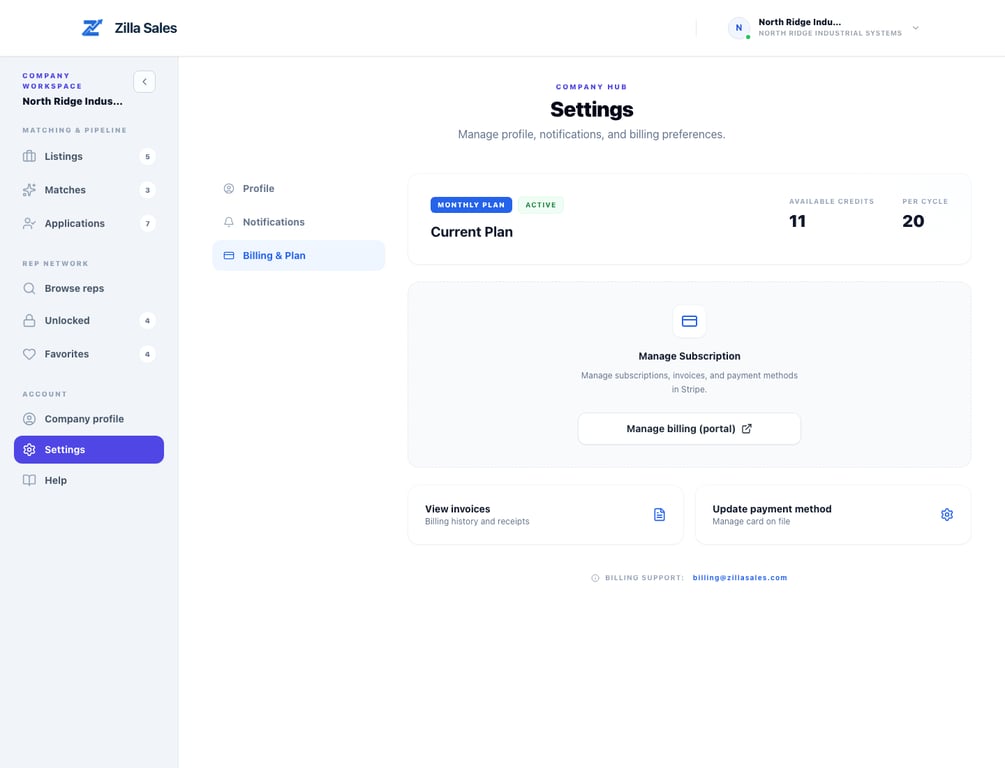
Cancellation normally leaves paid access active through the end of the current billing period. Your billing portal is the source of truth for the renewal date and subscription status.
What happens to credits and unlocked contacts?
Unused credits normally remain usable while the paid subscription is still active. Previously unlocked contacts remain accessible after paid access ends. Applicant-only contact details require current paid access unless your company also unlocked that rep.
Your recorded outreach stays in the Outreach log, including notes and outcomes; contact fields can show Contact details locked when access has ended. See Track rep outreach and follow-ups. Cancelling renewal is not the same as deleting the account.
Use remaining credits deliberately. Review profile evidence before unlocking, contact the strongest fits promptly, and continue proactive outreach during the active period instead of waiting only for inbound applications.
30-day money-back guarantee eligibility
Under the current Terms of Service, the guarantee applies when all of the following are true:
- You are a first-time paid customer.
- You did not receive qualified matches within 30 days of purchase.
- You email support@zillasales.com within that same 30-day window.
- The request is for the initial paid term, not a renewal.
- The account is not in breach of the Terms and the request is not connected to a chargeback, abuse, or fraudulent use.
When those conditions are met, the initial term is eligible for a full refund. The Terms control if help-center wording and the legal terms ever differ.
What to include in a guarantee request
Send the company name, account email, purchase date, opportunity link, and a short explanation of the matching outcome. Do not include full card details. Support may need to verify the subscription and matching history before confirming the result.
If the billing portal does not open
Confirm that you are signed into the correct company account. Then retry in a clean browser session. If the portal still fails, email support before the renewal date and include the account email, company name, and the exact error message.
Related guides
Was this article helpful?
Tell us whether this answered your question.