
Rep
After you apply: what happens next
See where your application appears, how a company may respond, and how to improve your next applications without over-applying.
After you apply, the opportunity moves into your applied list and the company can review the profile and line-card information attached to your account. A submitted application shows interest; it does not guarantee that the company will contact or select you.
Confirm that the application was submitted
The action on the opportunity changes to Applied after a successful submission. You can also open Applied to find opportunities you have already applied to.
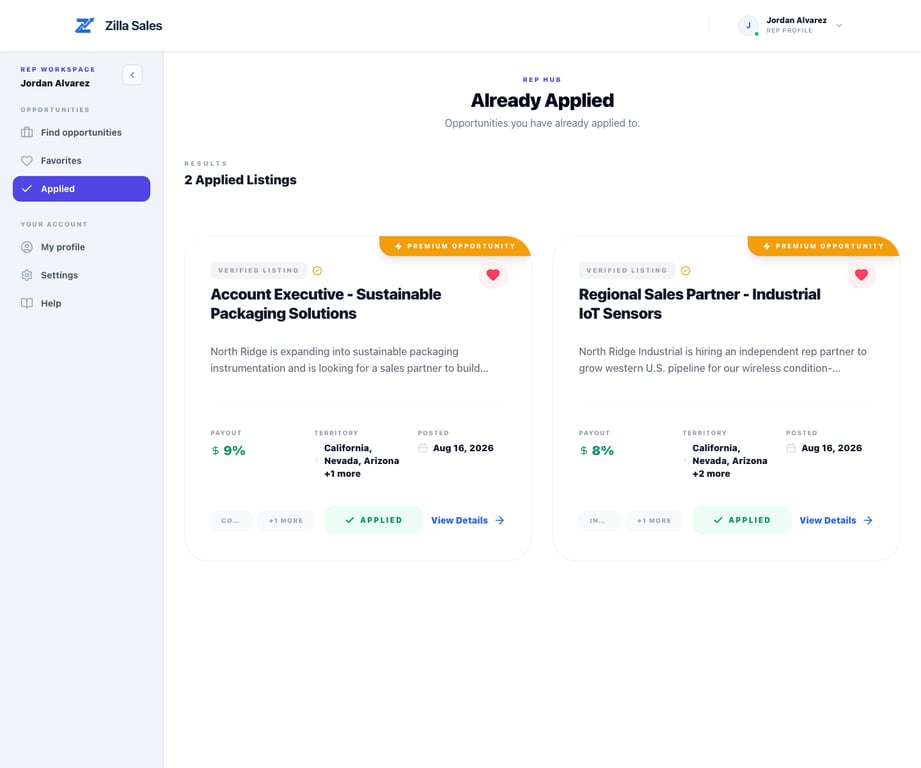
If the button does not change or the opportunity does not appear, refresh once and check the Applied page before submitting again. Repeated clicks should not be necessary.
What the company reviews
A company can compare your profile against the opportunity, including relevant experience, territories, industries, target customers, line-card evidence, and the information shown with your application. The company can favorite a profile, open the available detail, and use a contact credit when it decides direct outreach is worthwhile.
An application and an unlocked contact are different stages. Applying tells the company you are interested. An unlock gives the company access to the contact details currently available for your profile.
How a company may contact you
If a company unlocks your details, it may contact you using email, phone, LinkedIn, or another available method. Keep those fields current and monitor the inboxes attached to your profile. You can manage applicable alerts in Notification settings.
Zilla does not guarantee a response, interview, agreement, or sale. Response timing depends on the company, listing activity, fit, and its own review process.
What to do while waiting
- Keep your profile and line card accurate
- Continue searching for other strong-fit opportunities
- Avoid repeatedly applying to low-fit listings
- Prepare a concise explanation of your buyer access and territory experience
- Respond promptly and professionally if contacted
Do not send sensitive documents or financial information until you have independently verified the company and understand why the information is needed.
Learn from your applied list
Use the Applied page as a record of where you expressed interest. Every few weeks, compare the listings that led to conversations with those that did not. Look for patterns in buyer type, territory, industry, product adjacency, and commercial terms.
The platform currently records the applied state; it should not be treated as a complete sales CRM or a guaranteed live record of the company’s internal decision. Keep your own notes when a conversation moves outside Zilla Sales.
If you need help
If an application is missing or appears attached to the wrong account, contact support@zillasales.com. Include the opportunity link, account email, approximate application time, and a screenshot of the state you see.
Related guides
Was this article helpful?
Tell us whether this answered your question.